
The Beginner's Guide to Google Dynamic Search Ads (DSA)

Dynamic Search Ads (DSAs) have been a quiet workhorse of Google Ads since 2011, automating keyword discovery so you stop missing relevant searches your keyword lists never anticipated. Fifteen years on, the format is about to change shape: Google has confirmed that from September 2026, DSA campaigns will be automatically upgraded into its new AI Max for Search format.
That doesn't make DSAs obsolete. It makes understanding them more useful than ever, because what you set up today is the foundation Google's AI-driven search ads will inherit. This guide covers what DSAs are, where they fit alongside Performance Max in 2026, the four targeting options Google currently offers, how to set them up, and what to expect on performance.
What are Google Dynamic Search Ads (DSAs)?
Dynamic Search Ads use Google's crawl of your website to choose which queries to bid on and what headline to show. Instead of you supplying a keyword list, Google reads the content of your pages, decides which queries are relevant, and writes the headline at auction time. You still write the description and choose the landing page strategy. Everything else is automated.
Ideal for advertisers with a well-developed website or a large inventory, Dynamic Search Ads use your website to target your ads and can help fill in the gaps in your keywords-based campaigns.
The phrase that matters there is "fill in the gaps." No matter how thorough your keyword research, your lists will never capture every relevant query. Google still sees roughly 15% of daily searches that it has never seen before, searches no keyword list could have anticipated. DSAs catch those queries by matching them against the content already on your site.
DSAs in 2026 and the AI Max upgrade

Starting September 2026, Google will automatically upgrade Dynamic Search Ads campaigns to AI Max for Search, its next-generation AI-driven search ads format. Source: Google Ads Help, "About Dynamic Search Ads".
For most advertisers, this is good news, not bad. The principles you put in place for a DSA campaign (clean site content, a tight negative keyword list, a solid landing-page strategy) are exactly what AI Max needs to perform well. The accounts that struggle with the upgrade will be the ones whose DSAs are running unattended.
If you're starting from scratch in 2026, our view is to build the campaign as a DSA today and treat the September upgrade as a milestone to optimise toward. The structure you create now carries over.
Key benefits of Dynamic Search Ads
- Full keyword coverage. DSAs catch the long tail your keyword list will inevitably miss, including queries that didn't exist last month.
- Headlines written at auction time. Google matches each search to the most relevant page on your site and writes the headline to fit. You get tighter relevance than a manually built ad group could maintain at scale.
- Fast to launch. A DSA campaign can be live in under 15 minutes once your account is set up. There's no keyword sheet, no ad copy combinatorics, no per-ad-group bid work.
- Strong groundwork for AI Max. The site content, exclusions and negatives that make DSAs work are the same inputs AI Max optimises against.
When DSAs are not a fit
- Sites that change hourly. Google's crawler needs time to discover and re-index pages. If your inventory turns over every few hours (live-event ticketing, flash retail), DSAs will lag your real content.
- Thin or low-quality site copy. DSAs rely entirely on what's on your pages. Pages with little visible content, heavy JavaScript rendering, or off-brand text will produce off-brand ads.
- Accounts without negative keywords. Without a tight negative list, DSAs will pull queries you don't want, such as competitor names, irrelevant long-tail, support searches. Plan the negatives before you launch, not after.
How DSAs work
A traditional search ad bids on keywords you've added to an ad group. A DSA bids on pages on your site, and Google decides which queries each page is relevant to. The diagram below shows that flow.

So the workflow is: Google crawls your site, you tell it which parts of the site to consider, the user searches, Google matches the query to the most relevant page, and your ad shows with a headline written for that page-query pair.
Which targeting option should you pick?
Google currently offers four ways to tell DSAs which parts of your site to use. They sit on a spectrum from tightest control to broadest reach.

From most control to broadest reach

Target specific URLs, or any URL containing a string ("/services/", "/products/").
Best for: advertisers who want pure control, or sites Google hasn't fully indexed yet.

Upload a spreadsheet of URLs with custom labels, then target the whole feed or labelled subsets.
Best for: larger sites, or ecommerce inventories you already maintain in a feed.

Google groups your pages into themes (its category suggestions, plus a "Landing pages from your standard ad groups" group).
Best for: well-organised sites, and accounts that already run search and want DSAs to expand on those landing pages.

Targets every crawlable page on your site, the broadest possible reach.
Best for: mature accounts confident in their negatives and exclusions. Without those, this option will spend on irrelevant queries.
In practice, we start most accounts on URL contains or Page Feed for the first 2-4 weeks while we learn what queries the campaign pulls. Once the search term report is clean, we widen out.
Dynamic Search Ads best practices
- Review the search term report daily for the first fortnight. This is where DSAs are won or lost. Every irrelevant term you find goes onto the negative list before it spends again.
- Write the description like it has to stand alone. The headline and landing page are dynamic; the description is the only piece of copy you fully control. Make it carry the proposition.
- Aim for above 75% website coverage in the campaign's coverage report. Below that, you're leaving relevant traffic on the table.
- Exclude pages that are not commercial intent. About pages, careers pages, old blog posts, terms and conditions: all common DSA traps.
- Add your standard search keywords as negatives in the DSA campaign, so DSAs only catch what your keyword campaigns miss. The two campaigns should not compete with each other.
- Use Smart Bidding from launch. Maximize Conversions or Target CPA outperforms manual CPC on DSAs in almost every account we run; DSAs and automated bidding are designed to work together.
- Start at roughly 10% of your search-keyword campaign budget, per Google's own guidance, then scale once the search term report is clean and the cost-per-conversion is stable.
- Always run DSAs in their own campaign. Mixing DSAs and keyword ad groups in one campaign muddies bid signals and makes the search term report harder to act on.
How to set up Dynamic Search Ads
The setup has four stages. Google's Ads UI changes regularly, so the screenshots below show the principle rather than the latest pixels; labels and panel layouts will be slightly different from what's in your account today.


1. Create a new campaign and enable Dynamic Search Ads
Create a new Search campaign in the standard flow, then at ad-group level pick Dynamic from the Ad Group Type dropdown.
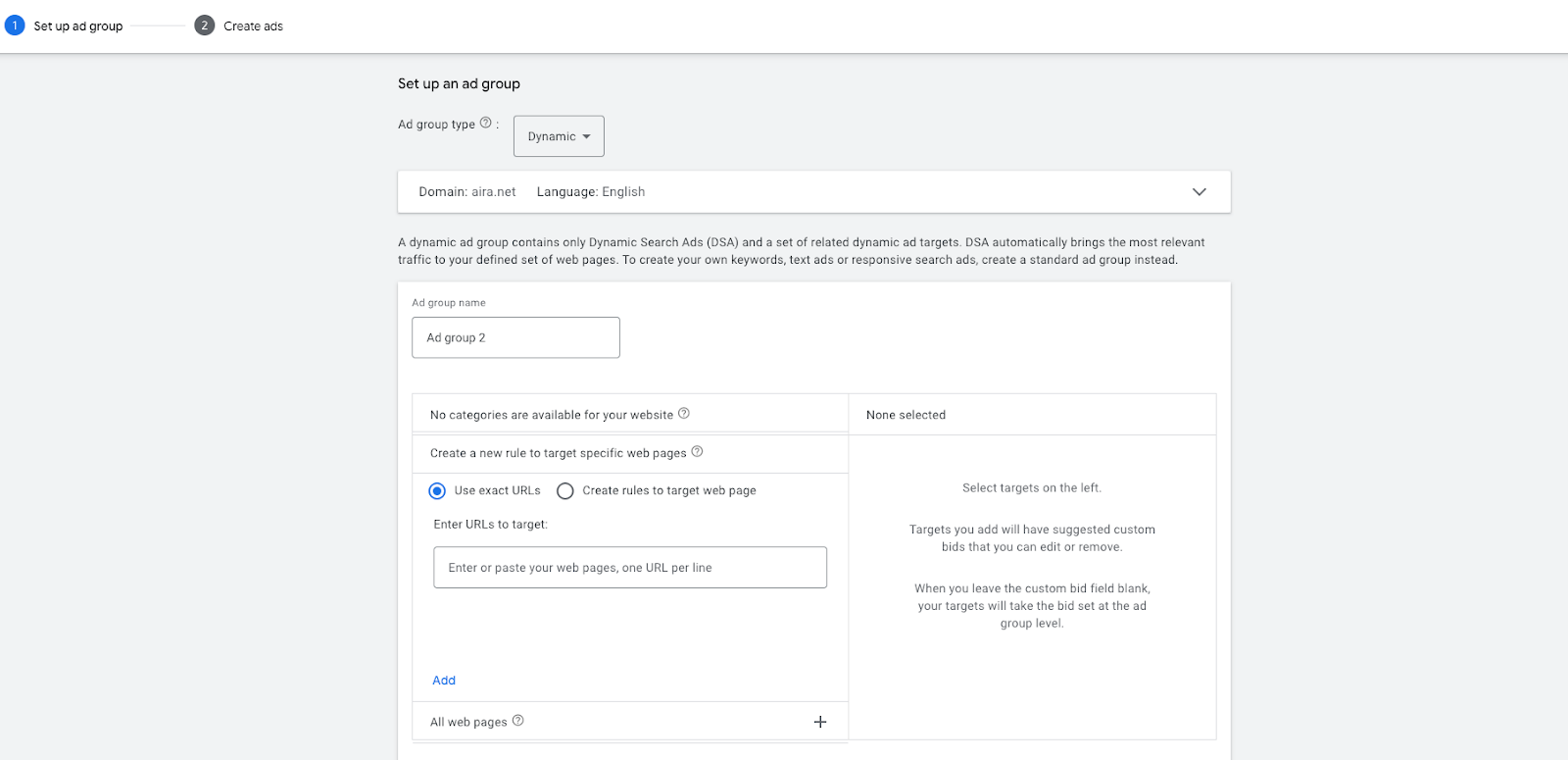
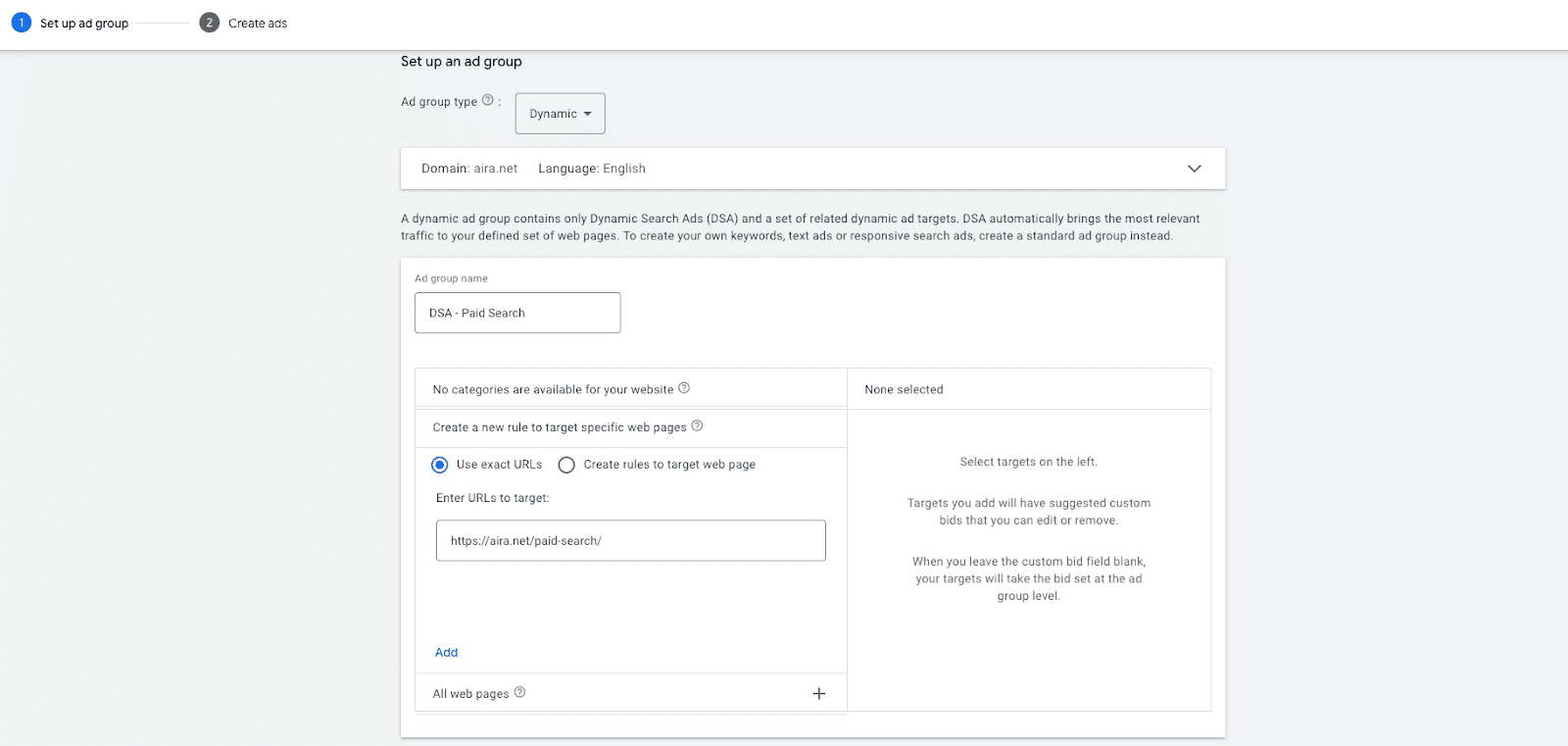
2. Select your dynamic ad targets
Pick one of the four targeting options described above. If you're starting from cold, URL contains or Page Feed give you the most predictable first month.
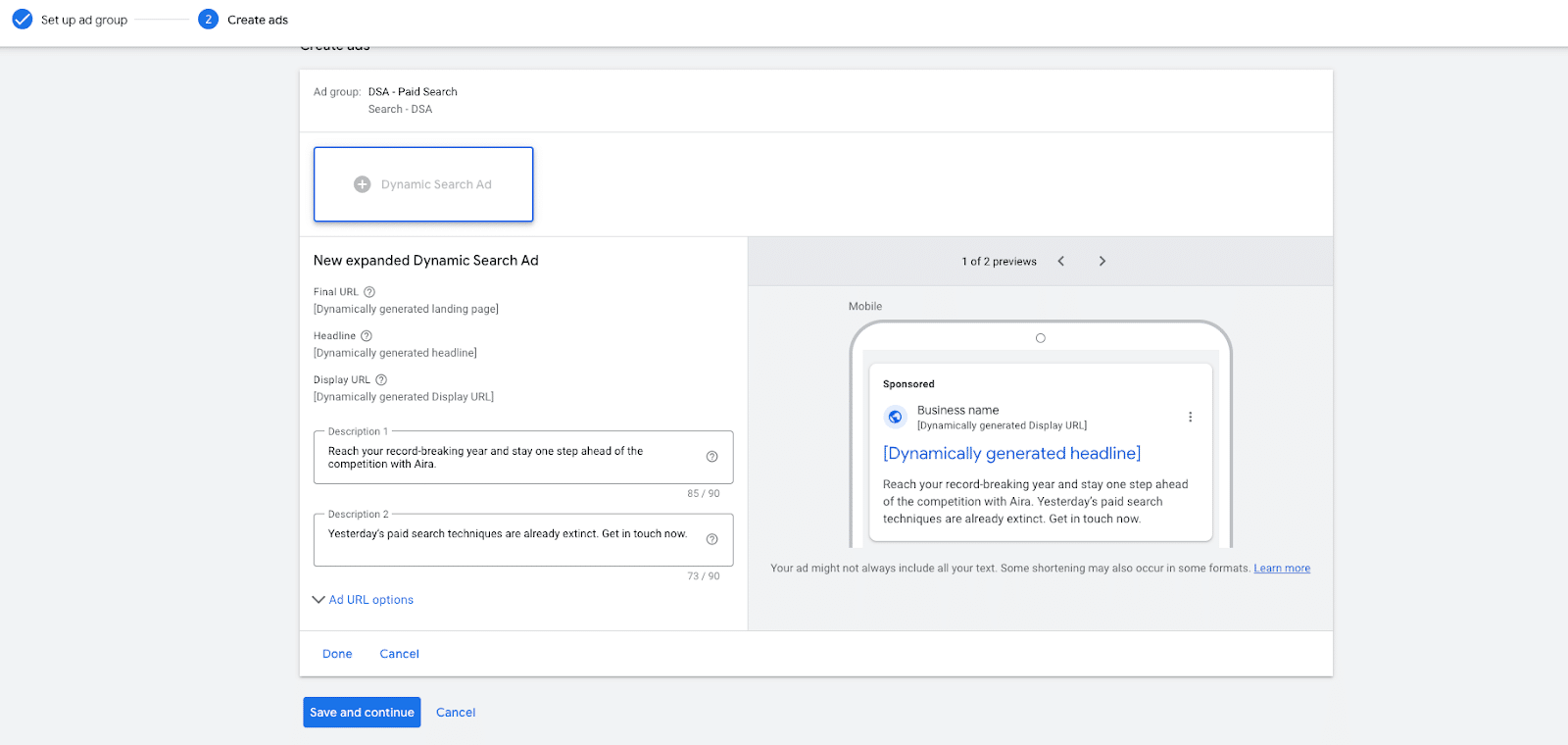
3. Write the description
Google writes the headline and picks the landing page. You write the description. Treat it as the part of the ad doing the work (proposition, differentiator, call-to-action) because the rest is automated.
4. Choose the bidding strategy
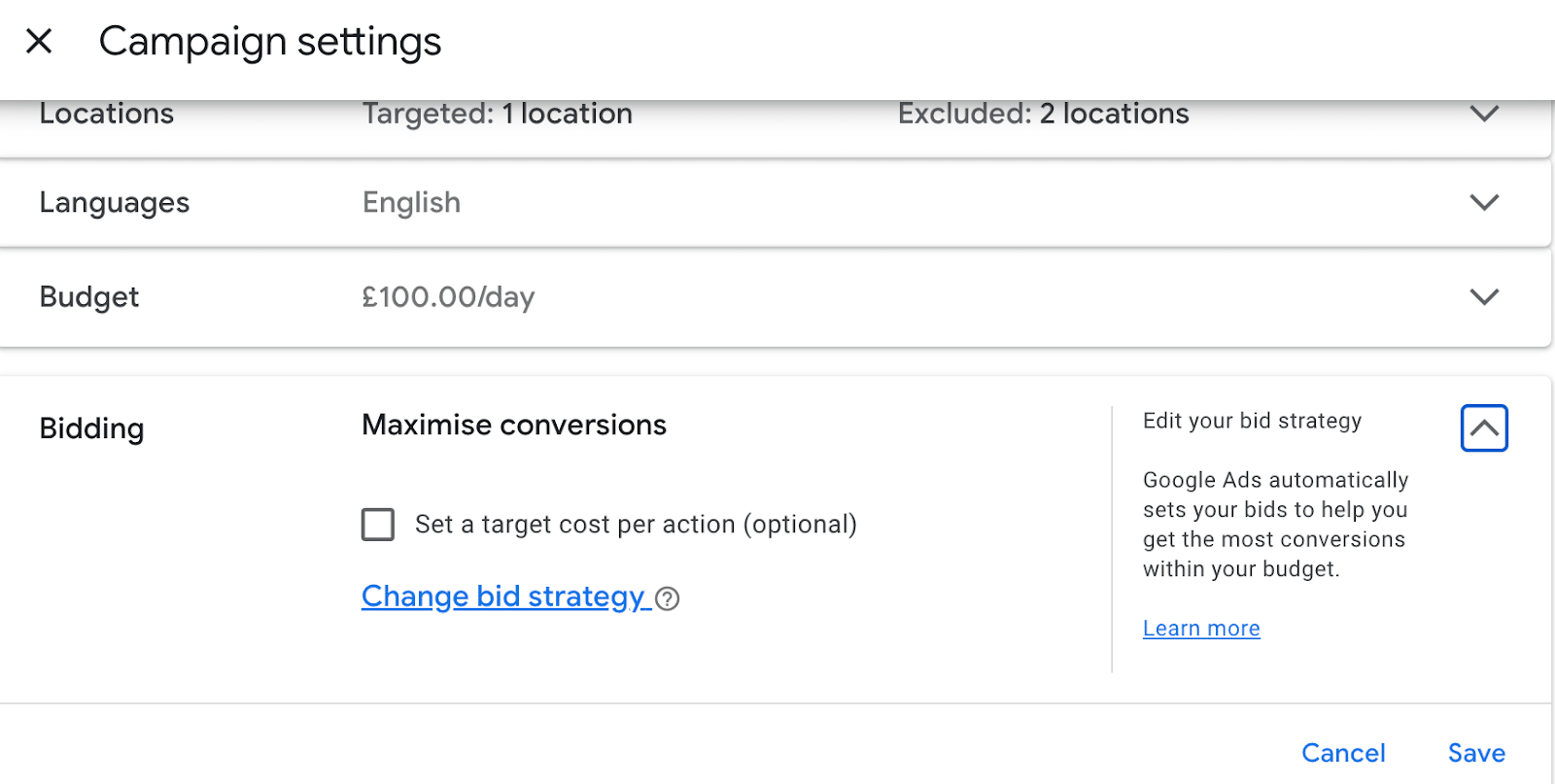
In 2026 the right answer is almost always Smart Bidding (Maximize Conversions or Target CPA). Manual CPC on DSAs is a holdover from the format's early years and we no longer recommend it for accounts with conversion tracking in place.
What performance can you expect from DSAs?
Google publishes its own average uplift figures, comparing DSA performance against the same advertisers' standard keyword-targeted campaigns. The shape of the data has stayed broadly consistent over the years: DSAs win on volume and efficiency, with a small CTR penalty traded for substantially better cost-per-click and cost-per-acquisition.
| Metric | DSA uplift vs keyword campaigns | What it means in practice |
|---|---|---|
| Clicks | +10% | You capture queries your keyword list missed. |
| Click-through rate | -5% | Headlines are auto-written, so creative isn't as tightly tuned as a hand-built ad. |
| Cost-per-click | -25% | Less competition on the long-tail queries DSAs catch. |
| Cost-per-acquisition | -25% | The CPC saving carries through to conversions when targeting and negatives are clean. |
Those are averages, not promises. The accounts that hit the upper end of that range share three habits: tight negative keyword lists, exclusions on non-commercial pages, and a daily review of the search term report for the first month.
DSAs vs Performance Max vs AI Max
If you're choosing between automated search formats, here's how the three fit together in 2026.
| Format | What it automates | Where it fits |
|---|---|---|
| Dynamic Search Ads | Keywords + headline (description and bidding are yours) | Filling gaps in keyword-led Search campaigns. Search-only inventory. |
| Performance Max | Everything: channels, audiences, creative, bidding | Cross-channel goal campaigns (Search, Display, YouTube, Discover, Maps). Strong with rich first-party data and asset libraries. |
| AI Max for Search | Keyword matching, asset optimisation, URL expansion, all in Search | Successor to DSAs from September 2026. Same search-only surface, more of the optimisation handed to Google's AI. |
The short version: DSAs and AI Max occupy the same slot in your account (search-only, AI-led keyword discovery). Performance Max is a different tool for a different job, and the two should coexist rather than replace each other.
Frequently asked questions
Will my DSA campaigns stop working after September 2026?
No. Google has announced that DSA campaigns will be automatically upgraded to AI Max for Search, not switched off. The settings you have in place (exclusions, negatives, page feeds, landing-page rules) carry over. Source: Google Ads Help.
Should I run DSAs alongside my keyword Search campaigns?
Yes. DSAs are designed to catch the queries your keyword list misses, not to replace it. Add your standard search keywords as negatives in the DSA campaign so the two don't compete.
Do DSAs work for small websites?
They can, but the smaller the site, the less benefit DSAs add over a well-built keyword campaign. We tend to recommend DSAs when a site has 50+ commercial pages worth indexing. Below that, the keyword campaign is doing most of the work already.
How long does it take to see results from a new DSA campaign?
Most accounts have a clean search term report and stable cost-per-acquisition by week 3-4. The first fortnight is where the work is: daily review of the search terms, adding negatives, excluding non-commercial pages. Skip that and the campaign never settles.
What's the minimum budget for a DSA campaign?
Google suggests starting at 10% of your existing search-keyword budget. In our experience that's a sensible floor: too small a budget and Smart Bidding can't gather enough conversion data to learn.
Should you use DSAs?
Yes, with two caveats. DSAs are a complement to keyword campaigns, not a replacement: their job is to catch the long-tail queries your keyword list never anticipated. And they reward attention in the first few weeks. Daily search term reviews and a tight negative list are what separate the accounts that hit Google's stated CPA uplift from those that quietly bleed budget.
For accounts with the Search Impression Share sitting below where it ought to be, or with growing inventory that the keyword list can't keep up with, DSAs are one of our first-port-of-call recommendations. With the AI Max upgrade coming in September 2026, the case for getting that foundation in place this year is stronger than ever.
If you'd like a hand thinking through whether DSAs fit your account, or how to prepare for AI Max, our PPC team would be happy to talk it through.