
11 Reasons Why You’ve Seen a Sudden Drop in Website Traffic


A sudden drop in website traffic almost always has a traceable cause. A search algorithm update, a penalty, a stray robots.txt rule, a set of lost rankings - each one pulls your numbers down, and each leaves a trail you can follow.
There is also the not-so-recent rise of AI overviews that can cause traffic to fall even when your rankings have not moved. With the AI overview answering the user's query right away, the user's click often never lands. You will find more on this below.
Here are the 11 things I work through whenever a site's traffic drops, starting with the usual issues and ending with some of the most common questions that I get asked.
Website traffic loss checklist
- Algorithm updates
- Tracking errors
- Robots.txt rules
- Redirects
- Crawl errors
- Ranking losses
- XML sitemap changes
- Manual penalties
- De-indexing
- Cannibalisation
- SERP changes and AI Overviews
1. Algorithm updates
Google changes its ranking systems constantly - some updates are minor, while some are site-changing core updates. Often Google are open about the big ones, even if the details are famously thin.
The quickest way to check whether an update is behind a drop in trafifc is Google's own Search Status Dashboard, which lists confirmed ranking and indexing updates and the dates they rolled out. Simply line those dates up against the day that your traffic fell. If you are looking for a second opinion, then volatility trackers like Mozcast and the Semrush Sensor are the place to go.
If a core update lines up with your drop, treat it differently from a technical fault. A core update is not a penalty, and there is no single thing to fix. Google's own guidance on core updates says to wait until the update has finished rolling out, then compare a week of Search Console data from before it started against a week from after it ended. Patience is the name of the game here as recovering lost traffic comes from improving the site as a whole, and improvements can take weeks or months to show.
2. Tracking errors
It still surprises me how often a "traffic drop" turns out to be a tracking problem. A site migration, a theme change or a tidy-up of the code, and the analytics tag quietly stops firing; the visits are still happening, they are just not being counted.
Rule this out first, because it is fast. Open GA4's Realtime report and load a page of the site yourself: your visit should appear within seconds. If it does not, the tag has been changed or removed. Confirm with Tag Assistant, which shows whether the tag fires and what it sends.
If you cannot get at the code yourself, ask your developers to confirm the tracking is where it needs to be and working. The sooner this is caught, the less data you lose - and the sooner you know whether you have a real problem or just a counting one. To prevent this issue from occurring, I usually complete monthly tracking checks to ensure everything is working as expected.
3. Incorrect robots.txt rules
Your site could be blocking search engines in its robots.txt file without anyone realising. It happens more than you would think - usually when a development or staging site is pushed live with its robots.txt untouched, carrying the rule that kept Google out during the build:
User-agent: *
Disallow: /
That rule tells every crawler to stay off the entire site. Check yours by visiting yourdomain.com/robots.txt directly. If a blanket Disallow: / is there, remove it. Then open Search Console's robots.txt report, which shows the version of the file Google last fetched and flags any errors. You can then request a recrawl so that Google's crawlers pick up the fix as soon as possible.
4. Redirect errors
Most sites of any size carry a stack of redirects, added through a .htaccess file or, on WordPress, a plugin. Every one of them is a chance for traffic to leak away if it breaks.
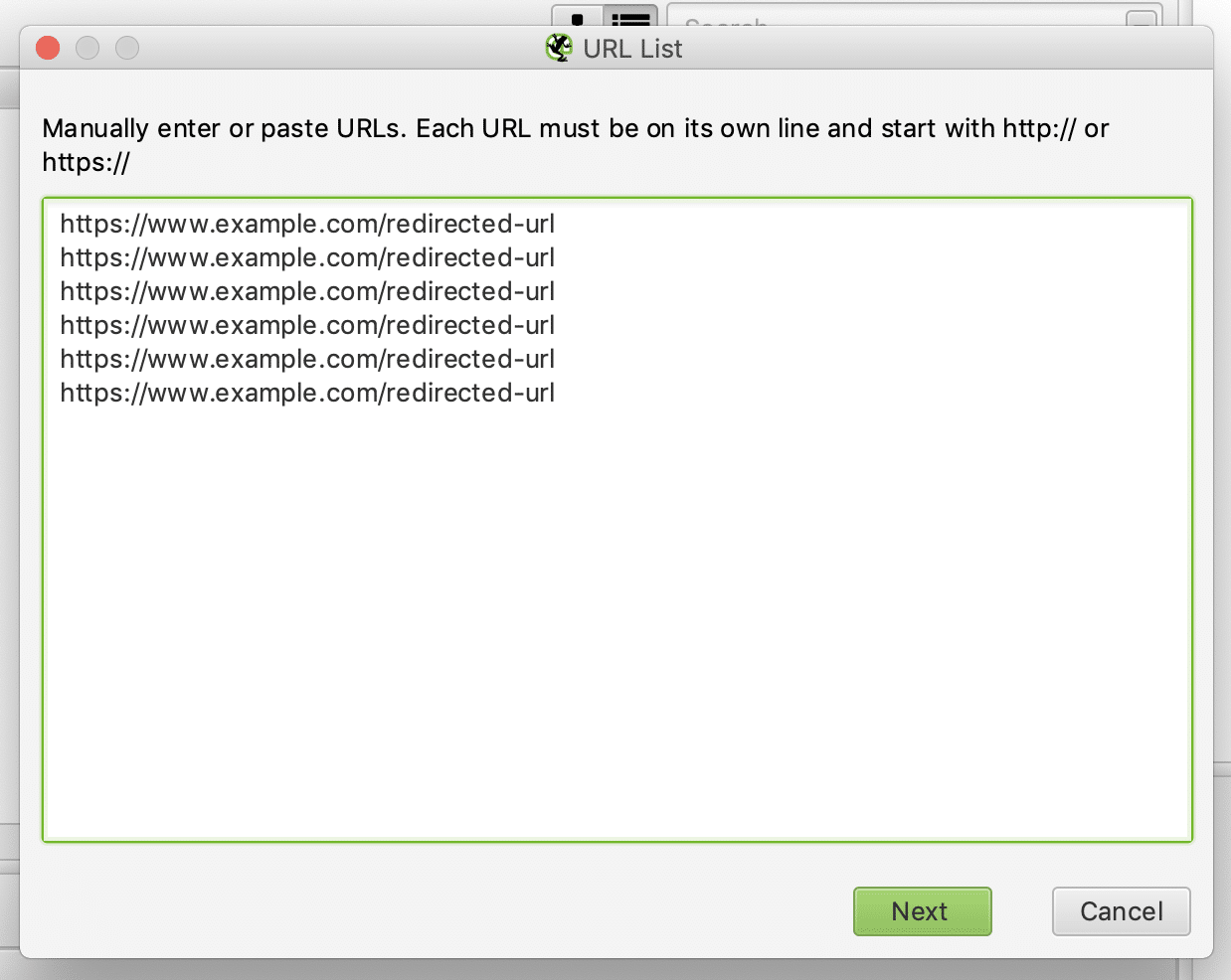
Four faults cause most of the damage: a 302 (temporary) used where a 301 (permanent) was meant, so ranking signals never fully pass; redirect chains, where one URL hops through several before it lands; redirects pointing at a 404; and redirect loops. To check existing redirects, I run the list through a crawler (Screaming Frog, in list mode: Mode > List) and read the response code and final destination of each URL. For quick checks while browsing, a redirect-tracing browser extension does the job - see our guide to the best Chrome extensions for SEO.
5. Crawl errors
In Search Console, open the Page indexing report (it used to be called Index Coverage) and look at anything marked "Not indexed" with an error. A page with an error against it is not in the index, and is not earning you traffic.
Common problems flagged here include:
- Server errors (5xx)
- Redirect errors
- Pages blocked by robots.txt
- Pages marked with a noindex tag
- Soft 404s
- Pages returning a 404
- Crawl issues that stopped Google from reaching the page
Work through them by error type rather than page by page - one root cause usually explains a whole group. Fix the cause, then use the report's "Validate Fix" button so Google rechecks the affected URLs, and the report closes the error off once they pass.
6. Ranking losses
A fall in organic rankings is one of the most common reasons traffic drops. If you run a rank tracker, the diagnosis is quick; if you do not, Search Console's Performance report is your best source.
The process I use:
- Using Search Console, or your rank tracker (mine is AccuRanker), pin down when traffic started to slide.
- Export the ranking keywords from before and after the drop.
- Put the two sets side by side in a spreadsheet.
- Compare the change in position, query by query.
- Win back the lost terms with fresh keyword research and mapping.
| Keyword | Position before | Position after |
|---|---|---|
| Keyword 1 | 3 | 12 |
| Keyword 2 | 5 | 9 |
| Keyword 3 | 2 | 18 |
| Keyword 4 | 7 | 8 |
| Keyword 5 | 4 | 24 |
Looking at the above list, it is good to assume that Keywords 1, 3 and 5 are where the traffic went. A visibility tool such as SISTRIX is also good for spotting terms that have slipped off page one. If you want to go deeper, here are some technical SEO tips to help your site rank.
7. XML sitemap changes
Only URLs that return a 200 response and are indexable belong in your XML sitemap. A change to that sitemap - pages dropped, broken URLs added - can quietly cost you traffic.
Find your sitemap (usually at https://yourdomain/sitemap.xml or https://yourdomain/sitemap_index.xml) and check it in Search Console's Sitemaps report, which shows when it was last read and how many of its URLs were indexed. Crawl the listed URLs and confirm each returns a 200 OK, and that new landing pages and articles are included. If the site has 200 live URLs and the sitemap lists 50, you will need to regenerate it and resubmit it through Search Console.
8. Manual actions and penalties
Google issues a manual action when a human reviewer finds something on your site that goes against their spam policies and search essentials. It is one of the few drops with a single, unambiguous cause and, for most sites, the least likely on this list.
Check the Manual Actions report in Search Console. If it says "No issues detected", then you can move on. If there is an action against your site, the report names exactly what to fix. You can then correct it across every affected page, then submit a reconsideration request. That review will take anything from a few days to weeks.
9. URLs being de-indexed
Sometimes pages simply fall out of the index - occasionally through a Google bug, more often because something on the page or the site told Google to drop them. Losing a few traffic-rich URLs from the index shows up fast in your numbers.
- Check the Page indexing report in Search Console for newly de-indexed URLs.
- Run your important pages through the URL Inspection tool to confirm they are still indexed - it shows the page's exact index status and why.
- If one has dropped out, fix the cause (a stray noindex, a canonical tag pointing elsewhere, a thin or duplicated page), then use "Request indexing" to push it back into the queue.
10. Keyword cannibalisation
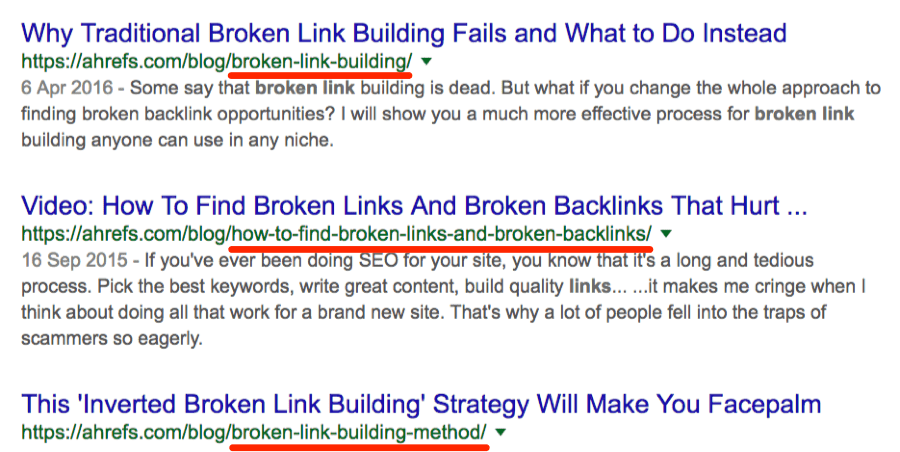
If you have published a lot of content around one topic without mapping the keywords carefully, you may have created a cannibalisation problem. This means that several of your own pages could be competing for the same term.
Source: Ahrefs.
When traffic for a query is split like this, Google has to choose between your pages and tends to rank none of them well. To find it, open Search Console's Performance report, filter to a query, and check the Pages tab - more than one URL from your site is the warning sign. The fix is to consolidate: pick the strongest page, fold the useful content from the others into it, and redirect the weaker URLs to it.
11. SERP changes and AI Overviews
This is the cause that has changed most since I first wrote this post. Your rankings can hold perfectly steady and your traffic can still fall - because the results page now answers more queries without users needing to click on a link.
The biggest single shift is AI Overviews. When Google generates an AI answer at the top of the results, the searcher often gets what they need without clicking through. Informational queries take the hardest hit - the "what is", "how do I" and definition-style searches. If a page that used to rank well for that kind of query has lost clicks but held its position, AI Overviews are the most likely cause.
AI overviews are not the only change however! Featured snippets, the knowledge panel, "People also ask", product grids and ever-larger ads all push the first true organic result further down the page. A position-three ranking earns far less clicks than it did a few years ago.
A search for "digital pr" shows how much the SERP has changed in recent years. Sponsored results, an AI Overview with its own image carousel and source panel, and the usual SERP furniture all load before the first organic listing - which is pushed completely below the fold:
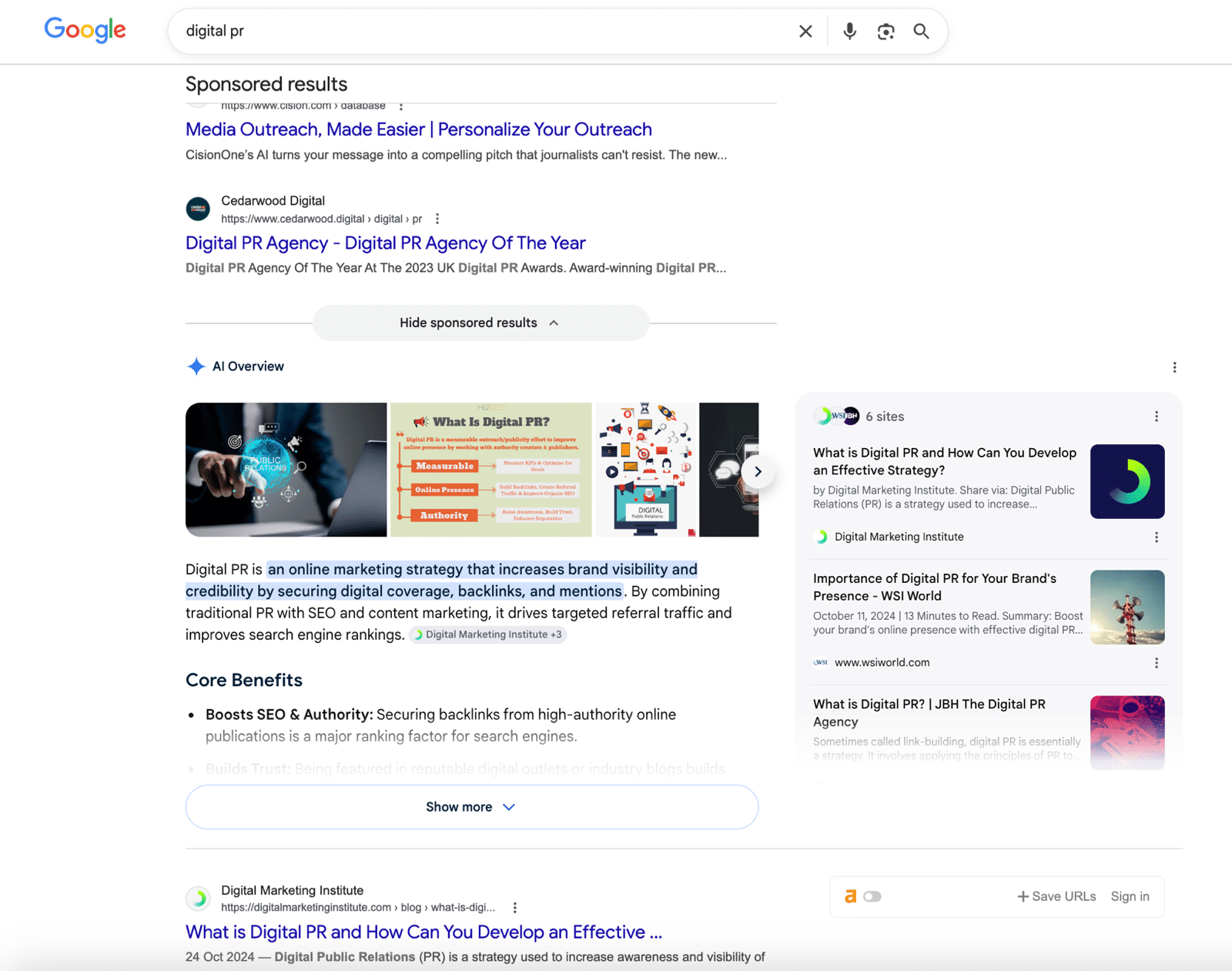
To confirm if the SERP itself has impacted your click through rate, you can compare clicks against impressions and average position in Search Console over the period of the drop. A steady position and impressions with falling clicks points straight at the SERP. Google folds clicks from its AI surfaces into the Performance report's "Web" search type, and its guidance on AI features confirms the SEO fundamentals still apply.
You cannot opt out of this, but you can adapt: lean towards searches that still need a real click - comparisons, opinion, original data, anything transactional - and write pages thorough enough that the AI answer leaves a reason to read on. If you would rather hand this to the specialists, our SEO team does exactly this kind of work.
Frequently asked questions
Why has my website traffic suddenly dropped?
Most sudden drops trace back to one of a handful of causes: a Google algorithm update, a tracking or technical fault, a loss of rankings, or a change to the search results page itself such as AI Overviews taking the click. Work through the 11 checks above and the cause usually surfaces quickly.
Can website traffic drop without losing rankings?
Yes - and it is increasingly common. AI Overviews and other SERP features answer the query on the results page, so you can hold your position and still lose the click. Compare clicks against average position in Search Console: if the position is steady but clicks have fallen, the results page is the likely cause, not your ranking.
How do I diagnose a traffic drop?
Start by confirming the drop is real - check the analytics tag is firing using GA4's Realtime report. Then open Search Console's Performance report and compare clicks, impressions and average position from before and after the drop. Cross-reference the date against Google's Search Status Dashboard to rule an algorithm update in or out.
How long does it take to recover from a traffic drop?
It depends on the cause. A tracking or technical fix recovers as soon as Google recrawls the affected pages this can range from days to a couple of weeks. A core update is slower: Google says it can take several months, and recovery comes from improving the site overall rather than from a single fix.
Is a sudden traffic drop a Google penalty?
Usually not. True penalties are manual actions, they are rare, and they are always flagged in Search Console's Manual Actions report. The vast majority of traffic drops are algorithmic or technical - not a penalty.
Summary
A traffic drop always has a reason, and a reason can almost always be fixed. It might be one cause or several at once - a core update plus a stray redirect, or a single traffic-rich page that has slipped out of the index.
Work through the 11 checks above in order. The cause usually surfaces quickly, and once you can name it, you can build a recovery plan around it - our SEO checklist for optimising web content is a good place to start once the technical basics are sound.